Software Tips
Get expert tips and tricks to make the most out of your software.
Understanding Report Periods
Overview
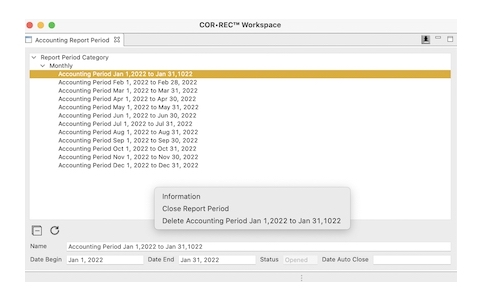
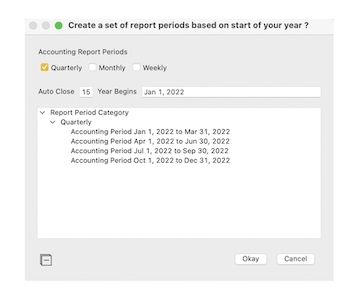
Report Periods are required throughout COR•REC for entry and management of all financial transactions. Report Period interaction can be as nuanced or as simple as your environment requires. Report Periods and Report Period sets may be added at any time.
Advantages
- Grouping transactions by date allows for fast, accurate reporting.
- Transaction dates are confined to user-designated periods — predetermined as valid or invalid, preventing transactions from being lost or misplaced due to dating errors.
- Period overlap enables flexible reporting without large, time-consuming data sorts.
- Balance Forward — if your accounting requires a Report Period to be closed (monthly, quarterly, year-to-year), balances from one or more closed Report Periods may be quickly forwarded to open Report Periods.
Knowledge
Report Periods may overlap, be fully enclosed, or stand alone. Two or more report periods may overlap, and transaction information will be available to any Report Period that encompasses the posted transaction date. This can be demonstrated by creating a Report Period that covers a single month, then creating one or more Report Periods that fall within that month. Report Periods that cover a span no other Report Period covers are stand-alone — as demonstrated by the default set offered when you first set up COR•REC Accounting, where each Report Period encompasses one month.
Automatically or manually closing a Report Period prevents transactions that fall within a closed period from being posted. If a transaction falls within both a closed period and an open Report Period, it will not post — the closed period takes precedence. Closing a Report Period that is itself enclosed within another Report Period should be avoided. Post-dated transactions will not post if the required Report Period has been closed; they are not removed, and may be edited to fall within an open Report Period.
Balance Forward. When forwarding from a closed period to an open period — monthly or yearly, for example — purposeful transactions are created. When using the Balance Forward option, reporting across multiple Report Periods that contain a forward balance, together with a Report Period having its balances forwarded, must be avoided. Balance Forwarding is covered fully within COR•REC Accounting documentation.
When a small subset of transaction information is required from within a Report Period, a Report Period may be created to cover the short span, or the transaction information may be obtained from a Chart of Account audit.
COR•REC documentation explains in detail how to create Report Periods and other associated functions.
Back to Tips & Tutorials